Compare commits
1
Commits
| Author | SHA1 | Date | |
|---|---|---|---|
 Donald Williams Donald Williams
|
25a866b2db |
@@ -1,14 +1,5 @@
|
|||||||
## CHANGELOGS
|
## CHANGELOGS
|
||||||
|
|
||||||
## 22 July 2025
|
|
||||||
- Updated sddm theme and script to work with the updated simple_sddm_2 theme
|
|
||||||
|
|
||||||
## 17 July 2025
|
|
||||||
- added quickshell script to replace ags for desktop overview
|
|
||||||
|
|
||||||
## 08 June 2025
|
|
||||||
- updated SDDM theme.
|
|
||||||
|
|
||||||
## 20 March 2025
|
## 20 March 2025
|
||||||
- adjusted hyprland installation script. This is great for those who are using -git packages
|
- adjusted hyprland installation script. This is great for those who are using -git packages
|
||||||
- added findutils as dependencies
|
- added findutils as dependencies
|
||||||
|
|||||||
@@ -8,6 +8,7 @@
|
|||||||
|
|
||||||
   <a href="https://discord.gg/kool-tech-world"> <img src="https://img.shields.io/discord/1151869464405606400?style=for-the-badge&logo=discord&color=cba6f7&link=https%3A%2F%2Fdiscord.gg%kool-tech-world"> </a>
|
   <a href="https://discord.gg/kool-tech-world"> <img src="https://img.shields.io/discord/1151869464405606400?style=for-the-badge&logo=discord&color=cba6f7&link=https%3A%2F%2Fdiscord.gg%kool-tech-world"> </a>
|
||||||
|
|
||||||
|
|
||||||
<br/>
|
<br/>
|
||||||
</div>
|
</div>
|
||||||
|
|
||||||
@@ -53,14 +54,12 @@ https://github.com/user-attachments/assets/49bc12b2-abaf-45de-a21c-67aacd9bb872
|
|||||||
</div>
|
</div>
|
||||||
|
|
||||||
### Gallery and Videos
|
### Gallery and Videos
|
||||||
|
|
||||||
#### 🎥 Feb 2025 Video explanation of installation with preset
|
#### 🎥 Feb 2025 Video explanation of installation with preset
|
||||||
|
|
||||||
- [YOUTUBE-LINK](https://youtu.be/wQ70lo7P6vA?si=_QcbrNKh_Bg0L3wC)
|
- [YOUTUBE-LINK](https://youtu.be/wQ70lo7P6vA?si=_QcbrNKh_Bg0L3wC)
|
||||||
- [YOUTUBE-Hyprland-Playlist](https://youtube.com/playlist?list=PLDtGd5Fw5_GjXCznR0BzCJJDIQSZJRbxx&si=iaNjLulFdsZ6AV-t)
|
- [YOUTUBE-Hyprland-Playlist](https://youtube.com/playlist?list=PLDtGd5Fw5_GjXCznR0BzCJJDIQSZJRbxx&si=iaNjLulFdsZ6AV-t)
|
||||||
|
|
||||||
### 🪧🪧🪧 ANNOUNCEMENT 🪧🪧🪧
|
|
||||||
|
|
||||||
|
### 🪧🪧🪧 ANNOUNCEMENT 🪧🪧🪧
|
||||||
- This Repo does not contain Hyprland Dots or configs! Dotfiles can be checked here [`Hyprland-Dots`](https://github.com/JaKooLit/Hyprland-Dots) . During installation, if you opt to copy pre-configured dots, it will be downloaded from that centralized repo.
|
- This Repo does not contain Hyprland Dots or configs! Dotfiles can be checked here [`Hyprland-Dots`](https://github.com/JaKooLit/Hyprland-Dots) . During installation, if you opt to copy pre-configured dots, it will be downloaded from that centralized repo.
|
||||||
- Hyprland-Dots use are constantly evolving / improving. you can check CHANGELOGS here [`Hyprland-Dots-Changelogs`](https://github.com/JaKooLit/Hyprland-Dots/wiki/Changelogs)
|
- Hyprland-Dots use are constantly evolving / improving. you can check CHANGELOGS here [`Hyprland-Dots-Changelogs`](https://github.com/JaKooLit/Hyprland-Dots/wiki/Changelogs)
|
||||||
- Since the Hyprland-Dots are evolving, some of the screenshots maybe old
|
- Since the Hyprland-Dots are evolving, some of the screenshots maybe old
|
||||||
@@ -73,32 +72,27 @@ https://github.com/user-attachments/assets/49bc12b2-abaf-45de-a21c-67aacd9bb872
|
|||||||
> Download this script on a directory where you have write permissions. ie. HOME. Or any directory within your home directory. Else script will fail
|
> Download this script on a directory where you have write permissions. ie. HOME. Or any directory within your home directory. Else script will fail
|
||||||
|
|
||||||
#### 🆕 Prerequisites
|
#### 🆕 Prerequisites
|
||||||
|
|
||||||
- This install script is intended for atleast Server type / Minimal Arch Linux installed.
|
- This install script is intended for atleast Server type / Minimal Arch Linux installed.
|
||||||
|
|
||||||
> [!NOTE]
|
> [!NOTE]
|
||||||
> 🔘 Pipewire and Pipewire audio
|
> 🔘 Pipewire and Pipewire audio
|
||||||
|
|
||||||
- This script will install pipewire and will also disable or will uninstall pulseaudio. If you dont want it, edit install.sh, about line 191 and comment the line `execute_script "pipewire.sh"` or you can simply just delete pipewire.sh in install-scripts directory before installing.
|
- This script will install pipewire and will also disable or will uninstall pulseaudio. If you dont want it, edit install.sh, about line 191 and comment the line `execute_script "pipewire.sh"` or you can simply just delete pipewire.sh in install-scripts directory before installing.
|
||||||
|
|
||||||
#### ✨ Customize the packages to be installed
|
#### ✨ Customize the packages to be installed
|
||||||
|
|
||||||
- inside the install-scripts directory, you can edit 00-hypr-pkgs.sh. Care though as the Hyprland Dots may not work properly!
|
- inside the install-scripts directory, you can edit 00-hypr-pkgs.sh. Care though as the Hyprland Dots may not work properly!
|
||||||
|
|
||||||
#### 🚩 Switching to SDDM assuming you have GDM installed and running
|
#### 🚩 Switching to SDDM assuming you have GDM installed and running
|
||||||
|
|
||||||
- if you really want switch to SDDM from GDM, you need to disable the gdm first.
|
- if you really want switch to SDDM from GDM, you need to disable the gdm first.
|
||||||
- `sudo systemctl disable gdm.service` then reboot
|
- `sudo systemctl disable gdm.service` then reboot
|
||||||
- after reboot, need to ran the install script via tty. So suggest download the install script first. Then disable gdm. reboot and once logged in, cd into Distro-Hyprland then `./install.sh` and then choose SDDM and SDDM theme in the options.
|
- after reboot, need to ran the install script via tty. So suggest download the install script first. Then disable gdm. reboot and once logged in, cd into Distro-Hyprland then `./install.sh` and then choose SDDM and SDDM theme in the options.
|
||||||
- NOTE: Distro-Hyprland is Arch-Hyprland, or Fedora-Hyprland .. depends on which install scripts you downloaded.
|
- NOTE: Distro-Hyprland is Arch-Hyprland, or Fedora-Hyprland .. depends on which install scripts you downloaded.
|
||||||
|
|
||||||
#### 💫 SDDM and GTK Themes offered
|
|
||||||
|
|
||||||
- If you opted to install SDDM theme, here's the [`LINK`](https://github.com/JaKooLit/simple-sddm-2) which is a modified fork of [`LINK`](https://github.com/Keyitdev/sddm-astronaut-theme)
|
#### 💫 SDDM and GTK Themes offered
|
||||||
|
- If you opted to install SDDM theme, here's the [`LINK`](https://codeberg.org/JaKooLit/sddm-sequoia) which is a fork of [`LINK`](https://codeberg.org/minMelody/sddm-sequoia)
|
||||||
- If you opted to install GTK Themes, Icons, here's the [`LINK`](https://github.com/JaKooLit/GTK-themes-icons). This also includes Bibata Modern Ice cursor.
|
- If you opted to install GTK Themes, Icons, here's the [`LINK`](https://github.com/JaKooLit/GTK-themes-icons). This also includes Bibata Modern Ice cursor.
|
||||||
|
|
||||||
#### 👀 NVidia GPU Owners.
|
#### 👀 NVidia GPU Owners.
|
||||||
|
|
||||||
- By default, nvidia-dkms will be installed. and only supports GTX 900 and newer. If required to install older driver, edit the nvidia.sh in install-scripts directory
|
- By default, nvidia-dkms will be installed. and only supports GTX 900 and newer. If required to install older driver, edit the nvidia.sh in install-scripts directory
|
||||||
|
|
||||||
> [!IMPORTANT]
|
> [!IMPORTANT]
|
||||||
@@ -107,19 +101,16 @@ https://github.com/user-attachments/assets/49bc12b2-abaf-45de-a21c-67aacd9bb872
|
|||||||
- After installation, check [`THIS`](https://github.com/JaKooLit/Hyprland-Dots/wiki/Notes_to_remember#--for-nvidia-gpu-users)
|
- After installation, check [`THIS`](https://github.com/JaKooLit/Hyprland-Dots/wiki/Notes_to_remember#--for-nvidia-gpu-users)
|
||||||
|
|
||||||
## ✨ Auto clone and install
|
## ✨ Auto clone and install
|
||||||
|
|
||||||
> [!CAUTION]
|
> [!CAUTION]
|
||||||
> If you are using FISH SHELL, DO NOT use this function. Clone and ran install.sh instead
|
> If you are using FISH SHELL, DO NOT use this function. Clone and ran install.sh instead
|
||||||
|
|
||||||
- you can use this command to automatically clone the installer and ran the script for you
|
- you can use this command to automatically clone the installer and ran the script for you
|
||||||
- NOTE: `curl` package is required before running this command
|
- NOTE: `curl` package is required before running this command
|
||||||
|
|
||||||
```bash
|
```bash
|
||||||
sh <(curl -L https://raw.githubusercontent.com/JaKooLit/Arch-Hyprland/main/auto-install.sh)
|
sh <(curl -L https://raw.githubusercontent.com/JaKooLit/Arch-Hyprland/main/auto-install.sh)
|
||||||
```
|
```
|
||||||
|
|
||||||
## ✨ to use this script
|
## ✨ to use this script
|
||||||
|
|
||||||
- clone this repo (latest commit only) to reduce file size download by using git. Change directory, make executable and run the script
|
- clone this repo (latest commit only) to reduce file size download by using git. Change directory, make executable and run the script
|
||||||
|
|
||||||
```bash
|
```bash
|
||||||
@@ -130,92 +121,61 @@ chmod +x install.sh
|
|||||||
```
|
```
|
||||||
|
|
||||||
### 💥 💥 UNINSTALL SCRIPT / Removal of Config Files
|
### 💥 💥 UNINSTALL SCRIPT / Removal of Config Files
|
||||||
|
|
||||||
- 11 March 2025, due to popular request, created a guided `uninstall.sh` script. USE this with caution as it may render your system unstable.
|
- 11 March 2025, due to popular request, created a guided `uninstall.sh` script. USE this with caution as it may render your system unstable.
|
||||||
- I will not be responsible if your system breaks
|
- I will not be responsible if your system breaks
|
||||||
- The best still to revert to previous state of your system is via `timeshift or snapper`
|
- The best still to revert to previous state of your system is via `timeshift or snapper`
|
||||||
|
|
||||||
#### ✨ for ZSH and OH-MY-ZSH installation
|
#### ✨ for ZSH and OH-MY-ZSH installation
|
||||||
|
|
||||||
> installer should auto change your default shell to zsh. However, if it does not, do this
|
> installer should auto change your default shell to zsh. However, if it does not, do this
|
||||||
|
|
||||||
```bash
|
```bash
|
||||||
chsh -s $(which zsh)
|
chsh -s $(which zsh)
|
||||||
zsh
|
zsh
|
||||||
source ~/.zshrc
|
source ~/.zshrc
|
||||||
```
|
```
|
||||||
|
|
||||||
- reboot or logout
|
- reboot or logout
|
||||||
- by default `agnosterzak` theme is installed. Which is from external oh-my-zsh theme. You can find more themes from this [`OH-MY-ZSH-THEMES`](https://github.com/ohmyzsh/ohmyzsh/wiki/Themes)
|
- by default `agnosterzak` theme is installed. Which is from external oh-my-zsh theme. You can find more themes from this [`OH-MY-ZSH-THEMES`](https://github.com/ohmyzsh/ohmyzsh/wiki/Themes)
|
||||||
- to change the theme, `SUPER SHIFT O` , choose desired theme, and close and open terminal.
|
- to change the theme, `SUPER SHIFT O` , choose desired theme, and close and open terminal.
|
||||||
- or manually edit `~/.zshrc` . Look for ZSH_THEME="desired theme"
|
- or manually edit `~/.zshrc` . Look for ZSH_THEME="desired theme"
|
||||||
|
|
||||||
#### 🎞️ AGS Overview DEMO
|
#### 🎞️ AGS Overview DEMO
|
||||||
|
|
||||||
- in case you wonder, here is a short demo of AGS overview [Youtube LINK](https://youtu.be/zY5SLNPBJTs)
|
- in case you wonder, here is a short demo of AGS overview [Youtube LINK](https://youtu.be/zY5SLNPBJTs)
|
||||||
|
|
||||||
#### ✨ TO DO once installation done and dotfiles copied
|
#### ✨ TO DO once installation done and dotfiles copied
|
||||||
|
|
||||||
- SUPER H for HINT or click on the waybar HINT! Button
|
- SUPER H for HINT or click on the waybar HINT! Button
|
||||||
- Head over to [KooL Hyprland WIKI](https://github.com/JaKooLit/Hyprland-Dots/wiki)
|
- Head over to [KooL Hyprland WIKI](https://github.com/JaKooLit/Hyprland-Dots/wiki)
|
||||||
|
|
||||||
#### 🙋 Got a questions regarding the Hyprland Dots or configurations? 🙋
|
#### 🙋 Got a questions regarding the Hyprland Dots or configurations? 🙋
|
||||||
|
|
||||||
- Head over to wiki Link [`WIKI`](https://github.com/JaKooLit/Hyprland-Dots/wiki)
|
- Head over to wiki Link [`WIKI`](https://github.com/JaKooLit/Hyprland-Dots/wiki)
|
||||||
|
|
||||||
#### ⌨ Keybinds
|
#### ⌨ Keybinds
|
||||||
|
|
||||||
- Keybinds [`CLICK`](https://github.com/JaKooLit/Hyprland-Dots/wiki/Keybinds)
|
- Keybinds [`CLICK`](https://github.com/JaKooLit/Hyprland-Dots/wiki/Keybinds)
|
||||||
|
|
||||||
> [!TIP]
|
> [!TIP]
|
||||||
> KooL Hyprland has a searchable keybind function via rofi. (SUPER SHIFT K) or right click the `HINTS` waybar button
|
> KooL Hyprland has a searchable keybind function via rofi. (SUPER SHIFT K) or right click the `HINTS` waybar button
|
||||||
|
|
||||||
#### 🔄 switching between Hyprland-git and none Hyprland-git
|
|
||||||
|
|
||||||
|
#### 🔄 switching between Hyprland-git and none Hyprland-git
|
||||||
- you can use my prepared script [`LINK`](https://github.com/JaKooLit/Arch-Hyprland/tree/main/assets/hyprland-install)
|
- you can use my prepared script [`LINK`](https://github.com/JaKooLit/Arch-Hyprland/tree/main/assets/hyprland-install)
|
||||||
- Readme is also there
|
- Readme is also there
|
||||||
|
|
||||||
#### 🙋 👋 Having issues or questions?
|
|
||||||
|
|
||||||
|
#### 🙋 👋 Having issues or questions?
|
||||||
- for the install part, kindly open issue on this repo
|
- for the install part, kindly open issue on this repo
|
||||||
- for the Pre-configured Hyprland dots / configuration, submit issue [`here`](https://github.com/JaKooLit/Hyprland-Dots/issues)
|
- for the Pre-configured Hyprland dots / configuration, submit issue [`here`](https://github.com/JaKooLit/Hyprland-Dots/issues)
|
||||||
|
|
||||||
#### 🔧 Proper way to re-installing a particular script from install-scripts directory
|
#### 🔧 Proper way to re-installing a particular script from install-scripts directory
|
||||||
|
|
||||||
- CD into Arch-Hyprland directory and then ran the below command.
|
- CD into Arch-Hyprland directory and then ran the below command.
|
||||||
- i.e. `./install-scripts/gtk-themes.sh` - For reinstall GTK Themes or
|
- i.e. `./install-scripts/gtk-themes.sh` - For reinstall GTK Themes or
|
||||||
- `./install-scripts/sddm.sh` - For reinstall sddm
|
- `./install-scripts/sddm.sh` - For reinstall sddm
|
||||||
|
|
||||||
> [!IMPORTANT]
|
> [!IMPORTANT]
|
||||||
> DO NOT cd into install-scripts directory as script will most likely to fail
|
> DO NOT cd into install-scripts directory as script will most likely to fail
|
||||||
#### 🛠️ Optional system monitor scripts (cross-distro compatible)
|
|
||||||
- These installer helpers will set up user-level services and install required packages automatically.
|
|
||||||
- Works on Fedora, Arch, and other distributions using standard tools.
|
|
||||||
- Re-run any time from the repo root (do not `cd` into `install-scripts`).
|
|
||||||
|
|
||||||
- `./install-scripts/battery-monitor.sh`
|
|
||||||
- Installs: `acpi`, `libnotify`
|
|
||||||
- Creates: `~/.config/hypr/scripts/battery-monitor.sh` and user service `battery-monitor.service`
|
|
||||||
- Manage: `systemctl --user status|start|stop battery-monitor`
|
|
||||||
- `./install-scripts/disk-monitor.sh`
|
|
||||||
- Installs: `libnotify`
|
|
||||||
- Creates: `~/.config/hypr/scripts/disk-monitor.sh` and user service `disk-monitor.service`
|
|
||||||
- Manage: `systemctl --user status|start|stop disk-monitor`
|
|
||||||
- `./install-scripts/temp-monitor.sh`
|
|
||||||
- Installs: `lm_sensors`, `libnotify`
|
|
||||||
- Detects sensors (runs `sudo sensors-detect --auto` once)
|
|
||||||
- Creates: `~/.config/hypr/scripts/temp-monitor.sh` and user service `temp-monitor.service`
|
|
||||||
- Manage: `systemctl --user status|start|stop temp-monitor`
|
|
||||||
> Packages above are installed by the respective installer scripts; no manual action is required. If you prefer package pre-install via the main package list, ensure `acpi`, `lm_sensors`, and `libnotify` are present in your setup.
|
|
||||||
|
|
||||||
#### 🛣️ Roadmap:
|
#### 🛣️ Roadmap:
|
||||||
|
|
||||||
- [ ] show a progress bar in downloading and compiling part when installing outside AUR or official repo
|
- [ ] show a progress bar in downloading and compiling part when installing outside AUR or official repo
|
||||||
|
|
||||||
#### ❗ some known issues for nvidia
|
#### ❗ some known issues for nvidia
|
||||||
|
|
||||||
- reports from members of my discord, states that some users of nvidia are getting stuck on sddm login. credit to @Kenni Fix stated was
|
- reports from members of my discord, states that some users of nvidia are getting stuck on sddm login. credit to @Kenni Fix stated was
|
||||||
|
|
||||||
```
|
```
|
||||||
while in sddm press ctrl+alt+F2 or F3
|
while in sddm press ctrl+alt+F2 or F3
|
||||||
log into your account
|
log into your account
|
||||||
@@ -224,21 +184,19 @@ log into your account
|
|||||||
`ls -l /dev/dri/by-path` to check where the symlink points to
|
`ls -l /dev/dri/by-path` to check where the symlink points to
|
||||||
)
|
)
|
||||||
```
|
```
|
||||||
|
|
||||||
- add "env = WLR_DRM_DEVICES,/dev/dri/cardX" to the ENVvariables config `~/.config/hypr/UserConfigs/ENVariables.conf` ; X being where the symlink of the gpu points to
|
- add "env = WLR_DRM_DEVICES,/dev/dri/cardX" to the ENVvariables config `~/.config/hypr/UserConfigs/ENVariables.conf` ; X being where the symlink of the gpu points to
|
||||||
|
|
||||||
- more info from the hyprland wiki [`Hyprland Wiki Link`](https://wiki.hyprland.org/FAQ/#my-external-monitor-is-blank--doesnt-render--receives-no-signal-laptop)
|
- more info from the hyprland wiki [`Hyprland Wiki Link`](https://wiki.hyprland.org/FAQ/#my-external-monitor-is-blank--doesnt-render--receives-no-signal-laptop)
|
||||||
|
|
||||||
|
|
||||||
- reports from a member of discord for Nvidia for additional env's
|
- reports from a member of discord for Nvidia for additional env's
|
||||||
- remove # from the following env's on
|
- remove # from the following env's on
|
||||||
|
|
||||||
```
|
```
|
||||||
env = GBM_BACKEND,nvidia-drm
|
env = GBM_BACKEND,nvidia-drm
|
||||||
env = WLR_RENDERER_ALLOW_SOFTWARE,1
|
env = WLR_RENDERER_ALLOW_SOFTWARE,1
|
||||||
```
|
```
|
||||||
|
|
||||||
#### ❗ other known issues
|
#### ❗ other known issues
|
||||||
|
|
||||||
- [ ] If you are using this script on an Arch-Based distros like Arco linux, or cachy OS or EOS or Manjaro, make sure to install pipewire, pipewire-pulse & pipewire-audio first. Arco Linux, on some of their ISO's still shipped with pulseaudio as audio backend. You will experience getting "stuck" on installation.
|
- [ ] If you are using this script on an Arch-Based distros like Arco linux, or cachy OS or EOS or Manjaro, make sure to install pipewire, pipewire-pulse & pipewire-audio first. Arco Linux, on some of their ISO's still shipped with pulseaudio as audio backend. You will experience getting "stuck" on installation.
|
||||||
- [ ] To install pipewire and its services , `sudo pacman -S pipewire wireplumber pipewire-audio pipewire-pulse` . When prompted, remove / replace pulseaudio. After that, you can ran `./install.sh`
|
- [ ] To install pipewire and its services , `sudo pacman -S pipewire wireplumber pipewire-audio pipewire-pulse` . When prompted, remove / replace pulseaudio. After that, you can ran `./install.sh`
|
||||||
- [ ] installing of cava-git on a newly installed Arch makes the install keep hanging. Switched back to cava. After booting and logged in, if cava dont work, replace it cava-git `yay -S cava-git` or `paru -S cava-git`
|
- [ ] installing of cava-git on a newly installed Arch makes the install keep hanging. Switched back to cava. After booting and logged in, if cava dont work, replace it cava-git `yay -S cava-git` or `paru -S cava-git`
|
||||||
@@ -248,28 +206,26 @@ env = WLR_RENDERER_ALLOW_SOFTWARE,1
|
|||||||
- [ ] to avoid this, I disabled it. You can re-enable again by editing `~/.zprofile` . Remove all the # on the first lines
|
- [ ] to avoid this, I disabled it. You can re-enable again by editing `~/.zprofile` . Remove all the # on the first lines
|
||||||
- [ ] ROFI issues (scaling, unexplained scaling etc). This is most likely to experience if you are installing on a system where rofi is currently installed. To fix it uninstall rofi and install rofi-wayland . `sudo pacman -Rns rofi` . Install rofi-wayland with `sudo pacman -S rofi-wayland`. Rofi-wayland is compatible with x11 so no need to worry.
|
- [ ] ROFI issues (scaling, unexplained scaling etc). This is most likely to experience if you are installing on a system where rofi is currently installed. To fix it uninstall rofi and install rofi-wayland . `sudo pacman -Rns rofi` . Install rofi-wayland with `sudo pacman -S rofi-wayland`. Rofi-wayland is compatible with x11 so no need to worry.
|
||||||
|
|
||||||
#### 🫥 Improving performance for Older Nvidia Cards using driver 470
|
|
||||||
|
|
||||||
|
#### 🫥 Improving performance for Older Nvidia Cards using driver 470
|
||||||
- [`SEE HERE`](https://github.com/JaKooLit/Hyprland-Dots/discussions/123#discussion-6035205)
|
- [`SEE HERE`](https://github.com/JaKooLit/Hyprland-Dots/discussions/123#discussion-6035205)
|
||||||
|
|
||||||
#### 📒 Final Notes
|
#### 📒 Final Notes
|
||||||
|
|
||||||
- join my discord channel [`Discord`](https://discord.com/invite/kool-tech-world)
|
- join my discord channel [`Discord`](https://discord.com/invite/kool-tech-world)
|
||||||
- Feel free to copy, re-distribute, and use this script however you want. Would appreciate if you give me some loves by crediting my work :)
|
- Feel free to copy, re-distribute, and use this script however you want. Would appreciate if you give me some loves by crediting my work :)
|
||||||
|
|
||||||
#### ✍️ Contributing
|
|
||||||
|
|
||||||
|
|
||||||
|
#### ✍️ Contributing
|
||||||
- As stated above, these script does not contain actual config files. These are only the installer of packages
|
- As stated above, these script does not contain actual config files. These are only the installer of packages
|
||||||
- If you want to contribute and/or test the Hyprland-Dotfiles (development branch), [`Hyprland-Dots-Development`](https://github.com/JaKooLit/Hyprland-Dots/tree/development)
|
- If you want to contribute and/or test the Hyprland-Dotfiles (development branch), [`Hyprland-Dots-Development`](https://github.com/JaKooLit/Hyprland-Dots/tree/development)
|
||||||
- Want to contribute on KooL-Hyprland-Dots Click [`HERE`](https://github.com/JaKooLit/Hyprland-Dots/blob/main/CONTRIBUTING.md) for a guide how to contribute
|
- Want to contribute on KooL-Hyprland-Dots Click [`HERE`](https://github.com/JaKooLit/Hyprland-Dots/blob/main/CONTRIBUTING.md) for a guide how to contribute
|
||||||
- Want to contribute on This Installer? Click [`HERE`](https://github.com/JaKooLit/Arch-Hyprland/blob/main/CONTRIBUTING.md) for a guide how to contribute
|
- Want to contribute on This Installer? Click [`HERE`](https://github.com/JaKooLit/Arch-Hyprland/blob/main/CONTRIBUTING.md) for a guide how to contribute
|
||||||
|
|
||||||
#### 👍👍👍 Thanks and Credits!
|
#### 👍👍👍 Thanks and Credits!
|
||||||
|
|
||||||
- [`Hyprland`](https://hyprland.org/) Of course to Hyprland and @vaxerski for this awesome Dynamic Tiling Manager.
|
- [`Hyprland`](https://hyprland.org/) Of course to Hyprland and @vaxerski for this awesome Dynamic Tiling Manager.
|
||||||
|
|
||||||
## 💖 Support
|
## 💖 Support
|
||||||
|
|
||||||
- a Star on my Github repos would be nice 🌟
|
- a Star on my Github repos would be nice 🌟
|
||||||
|
|
||||||
- Subscribe to my Youtube Channel [YouTube](https://www.youtube.com/@Ja.KooLit)
|
- Subscribe to my Youtube Channel [YouTube](https://www.youtube.com/@Ja.KooLit)
|
||||||
@@ -283,15 +239,14 @@ or
|
|||||||
[](https://www.buymeacoffee.com/JaKooLit)
|
[](https://www.buymeacoffee.com/JaKooLit)
|
||||||
|
|
||||||
Or you can donate cryto on my btc wallet :)
|
Or you can donate cryto on my btc wallet :)
|
||||||
|
|
||||||
> 1N3MeV2dsX6gQB42HXU6MF2hAix1mqjo8i
|
> 1N3MeV2dsX6gQB42HXU6MF2hAix1mqjo8i
|
||||||
|
|
||||||

|

|
||||||
|
|
||||||
#### 📹 Youtube videos (Click to view and watch the playlist) 📹
|
|
||||||
|
|
||||||
|
#### 📹 Youtube videos (Click to view and watch the playlist) 📹
|
||||||
[](https://youtube.com/playlist?list=PLDtGd5Fw5_GjXCznR0BzCJJDIQSZJRbxx&si=iaNjLulFdsZ6AV-t)
|
[](https://youtube.com/playlist?list=PLDtGd5Fw5_GjXCznR0BzCJJDIQSZJRbxx&si=iaNjLulFdsZ6AV-t)
|
||||||
|
|
||||||
## 🥰🥰 💖💖 👍👍👍
|
|
||||||
|
|
||||||
|
## 🥰🥰 💖💖 👍👍👍
|
||||||
[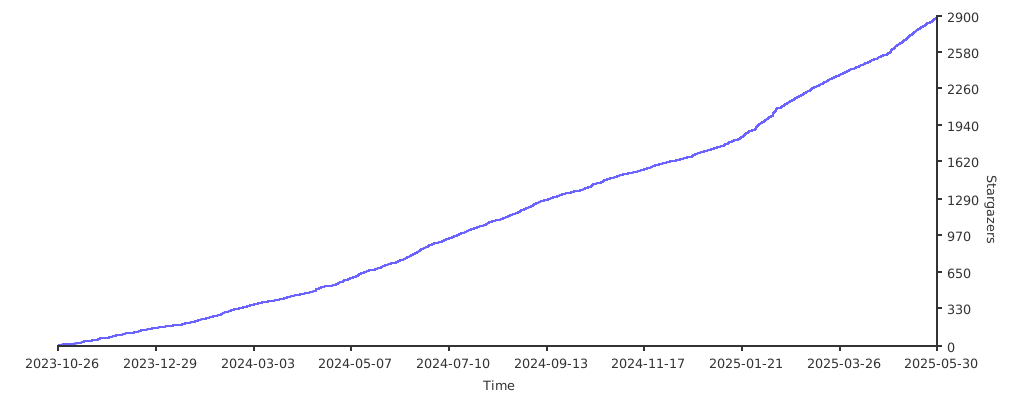](https://starchart.cc/JaKooLit/Arch-Hyprland)
|
[](https://starchart.cc/JaKooLit/Arch-Hyprland)
|
||||||
|
|||||||
@@ -36,12 +36,13 @@ hypr_package=(
|
|||||||
qt5ct
|
qt5ct
|
||||||
qt6ct
|
qt6ct
|
||||||
qt6-svg
|
qt6-svg
|
||||||
rofi
|
rofi-wayland
|
||||||
slurp
|
slurp
|
||||||
swappy
|
swappy
|
||||||
swaync
|
swaync
|
||||||
swww
|
swww
|
||||||
unzip # needed later
|
unzip # needed later
|
||||||
|
uwsm # needed for login
|
||||||
wallust
|
wallust
|
||||||
waybar
|
waybar
|
||||||
wget
|
wget
|
||||||
|
|||||||
@@ -83,46 +83,6 @@ if git clone --depth=1 https://github.com/JaKooLit/ags_v1.9.0.git; then
|
|||||||
meson setup build
|
meson setup build
|
||||||
if sudo meson install -C build 2>&1 | tee -a "$MLOG"; then
|
if sudo meson install -C build 2>&1 | tee -a "$MLOG"; then
|
||||||
printf "\n${OK} ${YELLOW}Aylur's GTK shell $ags_tag${RESET} installed successfully.\n" 2>&1 | tee -a "$MLOG"
|
printf "\n${OK} ${YELLOW}Aylur's GTK shell $ags_tag${RESET} installed successfully.\n" 2>&1 | tee -a "$MLOG"
|
||||||
|
|
||||||
# Patch installed AGS launcher to ensure GI typelibs in /usr/local/lib are discoverable in GJS ESM
|
|
||||||
printf "${NOTE} Applying AGS launcher patch for GI typelibs search path...\n"
|
|
||||||
LAUNCHER="/usr/local/share/com.github.Aylur.ags/com.github.Aylur.ags"
|
|
||||||
if sudo test -f "$LAUNCHER"; then
|
|
||||||
# 1) Switch from GIRepository ESM import to GLib and drop deprecated prepend_* calls
|
|
||||||
sudo sed -i \
|
|
||||||
-e 's|^import GIR from "gi://GIRepository?version=2.0";$|import GLib from "gi://GLib";|' \
|
|
||||||
-e '/GIR.Repository.prepend_search_path/d' \
|
|
||||||
-e '/GIR.Repository.prepend_library_path/d' \
|
|
||||||
"$LAUNCHER"
|
|
||||||
|
|
||||||
# 2) Inject GI_TYPELIB_PATH export right after the GLib import
|
|
||||||
sudo awk '{print} $0 ~ /^import GLib from "gi:\/\/GLib";$/ {print "const __old = GLib.getenv(\"GI_TYPELIB_PATH\");"; print "GLib.setenv(\"GI_TYPELIB_PATH\", \"/usr/local/lib\" + (__old ? \":\" + __old : \"\"), true);"}' "$LAUNCHER" | sudo tee "$LAUNCHER" >/dev/null
|
|
||||||
|
|
||||||
printf "${OK} AGS launcher patched.\n"
|
|
||||||
|
|
||||||
# Create an env-setting wrapper for AGS to ensure GI typelibs/libs are discoverable
|
|
||||||
printf "${NOTE} Creating env wrapper /usr/local/bin/ags...\n"
|
|
||||||
MAIN_JS="/usr/local/share/com.github.Aylur.ags/com.github.Aylur.ags"
|
|
||||||
if ! sudo test -f "$MAIN_JS"; then
|
|
||||||
MAIN_JS="/usr/share/com.github.Aylur.ags/com.github.Aylur.ags"
|
|
||||||
fi
|
|
||||||
sudo tee /usr/local/bin/ags >/dev/null <<WRAP
|
|
||||||
#!/usr/bin/env bash
|
|
||||||
set -euo pipefail
|
|
||||||
cd "$HOME" 2>/dev/null || true
|
|
||||||
# Ensure GI typelibs and native libs are discoverable before gjs ESM loads
|
|
||||||
export GI_TYPELIB_PATH="/usr/local/lib64:/usr/local/lib:/usr/local/lib64/girepository-1.0:/usr/local/lib/girepository-1.0:/usr/lib64/girepository-1.0:/usr/lib/girepository-1.0:/usr/lib64/ags:/usr/lib/ags:${GI_TYPELIB_PATH-}"
|
|
||||||
export LD_LIBRARY_PATH="/usr/local/lib64:/usr/local/lib:${LD_LIBRARY_PATH-}"
|
|
||||||
exec /usr/bin/gjs -m "$MAIN_JS" -- "$@"
|
|
||||||
WRAP
|
|
||||||
sudo chmod 0755 /usr/local/bin/ags
|
|
||||||
# Ensure ESM entry is readable by gjs
|
|
||||||
sudo chmod 0644 /usr/local/share/com.github.Aylur.ags/com.github.Aylur.ags 2>/dev/null || true
|
|
||||||
sudo chmod 0644 /usr/share/com.github.Aylur.ags/com.github.Aylur.ags 2>/dev/null || true
|
|
||||||
printf "${OK} AGS wrapper installed at /usr/local/bin/ags\n"
|
|
||||||
else
|
|
||||||
printf "${WARN} Launcher not found at $LAUNCHER, skipping patch.\n"
|
|
||||||
fi
|
|
||||||
else
|
else
|
||||||
echo -e "\n${ERROR} ${YELLOW}Aylur's GTK shell $ags_tag${RESET} Installation failed\n " 2>&1 | tee -a "$MLOG"
|
echo -e "\n${ERROR} ${YELLOW}Aylur's GTK shell $ags_tag${RESET} Installation failed\n " 2>&1 | tee -a "$MLOG"
|
||||||
fi
|
fi
|
||||||
|
|||||||
@@ -1,116 +0,0 @@
|
|||||||
#!/bin/bash
|
|
||||||
# 💫 https://github.com/JaKooLit 💫 #
|
|
||||||
# Battery Monitor and Low Battery Notification #
|
|
||||||
|
|
||||||
battery=(
|
|
||||||
acpi
|
|
||||||
libnotify
|
|
||||||
)
|
|
||||||
|
|
||||||
|
|
||||||
## WARNING: DO NOT EDIT BEYOND THIS LINE IF YOU DON'T KNOW WHAT YOU ARE DOING! ##
|
|
||||||
SCRIPT_DIR="$( cd "$( dirname "${BASH_SOURCE[0]}" )" && pwd )"
|
|
||||||
|
|
||||||
# Change the working directory to the parent directory of the script
|
|
||||||
PARENT_DIR="$SCRIPT_DIR/.."
|
|
||||||
cd "$PARENT_DIR" || { echo "${ERROR} Failed to change directory to $PARENT_DIR"; exit 1; }
|
|
||||||
|
|
||||||
# Source the global functions script
|
|
||||||
if ! source "$(dirname "$(readlink -f "$0")")/Global_functions.sh"; then
|
|
||||||
echo "Failed to source Global_functions.sh"
|
|
||||||
exit 1
|
|
||||||
fi
|
|
||||||
|
|
||||||
# Set the name of the log file to include the current date and time
|
|
||||||
LOG="Install-Logs/install-$(date +%d-%H%M%S)_battery-monitor.log"
|
|
||||||
|
|
||||||
# Battery Monitor
|
|
||||||
printf "${NOTE} Installing ${SKY_BLUE}Battery Monitor${RESET} Packages...\n"
|
|
||||||
for BAT in "${battery[@]}"; do
|
|
||||||
install_package "$BAT" "$LOG"
|
|
||||||
done
|
|
||||||
|
|
||||||
# Create battery monitoring script
|
|
||||||
printf "${NOTE} Creating ${YELLOW}battery monitoring${RESET} script...\n"
|
|
||||||
|
|
||||||
BATTERY_SCRIPT="$HOME/.config/hypr/scripts/battery-monitor.sh"
|
|
||||||
mkdir -p "$HOME/.config/hypr/scripts"
|
|
||||||
|
|
||||||
cat > "$BATTERY_SCRIPT" << 'EOF'
|
|
||||||
#!/bin/bash
|
|
||||||
# Low Battery Notification Script
|
|
||||||
# Monitors battery level and sends notifications
|
|
||||||
|
|
||||||
# Configuration
|
|
||||||
LOW_BATTERY_THRESHOLD=20
|
|
||||||
CRITICAL_BATTERY_THRESHOLD=10
|
|
||||||
CHECK_INTERVAL=60 # Check every 60 seconds
|
|
||||||
|
|
||||||
# Track notification state to avoid spam
|
|
||||||
NOTIFIED_LOW=false
|
|
||||||
NOTIFIED_CRITICAL=false
|
|
||||||
|
|
||||||
while true; do
|
|
||||||
# Get battery percentage
|
|
||||||
BATTERY_LEVEL=$(acpi -b | grep -P -o '[0-9]+(?=%)')
|
|
||||||
BATTERY_STATUS=$(acpi -b | grep -o 'Discharging\|Charging\|Full')
|
|
||||||
|
|
||||||
# Only send notifications when discharging
|
|
||||||
if [ "$BATTERY_STATUS" = "Discharging" ]; then
|
|
||||||
if [ "$BATTERY_LEVEL" -le "$CRITICAL_BATTERY_THRESHOLD" ] && [ "$NOTIFIED_CRITICAL" = false ]; then
|
|
||||||
notify-send -u critical -i battery-caution "Critical Battery" "Battery level is at ${BATTERY_LEVEL}%! Please plug in your charger immediately."
|
|
||||||
NOTIFIED_CRITICAL=true
|
|
||||||
NOTIFIED_LOW=true
|
|
||||||
elif [ "$BATTERY_LEVEL" -le "$LOW_BATTERY_THRESHOLD" ] && [ "$NOTIFIED_LOW" = false ]; then
|
|
||||||
notify-send -u normal -i battery-low "Low Battery" "Battery level is at ${BATTERY_LEVEL}%. Consider plugging in your charger."
|
|
||||||
NOTIFIED_LOW=true
|
|
||||||
fi
|
|
||||||
else
|
|
||||||
# Reset notification flags when charging or full
|
|
||||||
NOTIFIED_LOW=false
|
|
||||||
NOTIFIED_CRITICAL=false
|
|
||||||
fi
|
|
||||||
|
|
||||||
sleep "$CHECK_INTERVAL"
|
|
||||||
done
|
|
||||||
EOF
|
|
||||||
|
|
||||||
chmod +x "$BATTERY_SCRIPT"
|
|
||||||
|
|
||||||
printf "${OK} Battery monitoring script created at ${YELLOW}$BATTERY_SCRIPT${RESET}\n"
|
|
||||||
|
|
||||||
# Create systemd user service
|
|
||||||
printf "${NOTE} Creating ${YELLOW}systemd user service${RESET} for battery monitoring...\n"
|
|
||||||
|
|
||||||
SYSTEMD_DIR="$HOME/.config/systemd/user"
|
|
||||||
mkdir -p "$SYSTEMD_DIR"
|
|
||||||
|
|
||||||
cat > "$SYSTEMD_DIR/battery-monitor.service" << EOF
|
|
||||||
[Unit]
|
|
||||||
Description=Battery Level Monitor
|
|
||||||
After=graphical-session.target
|
|
||||||
|
|
||||||
[Service]
|
|
||||||
Type=simple
|
|
||||||
ExecStart=$BATTERY_SCRIPT
|
|
||||||
Restart=on-failure
|
|
||||||
RestartSec=10
|
|
||||||
|
|
||||||
[Install]
|
|
||||||
WantedBy=default.target
|
|
||||||
EOF
|
|
||||||
|
|
||||||
printf "${OK} Systemd service created\n"
|
|
||||||
|
|
||||||
# Enable and start the service
|
|
||||||
printf "${NOTE} Enabling and starting ${YELLOW}battery-monitor${RESET} service...\n"
|
|
||||||
systemctl --user daemon-reload
|
|
||||||
systemctl --user enable battery-monitor.service 2>&1 | tee -a "$LOG"
|
|
||||||
systemctl --user start battery-monitor.service 2>&1 | tee -a "$LOG"
|
|
||||||
|
|
||||||
printf "${OK} Battery monitor service is now running!\n"
|
|
||||||
printf "${INFO} You can check status with: ${YELLOW}systemctl --user status battery-monitor${RESET}\n"
|
|
||||||
printf "${INFO} To stop: ${YELLOW}systemctl --user stop battery-monitor${RESET}\n"
|
|
||||||
printf "${INFO} To disable: ${YELLOW}systemctl --user disable battery-monitor${RESET}\n"
|
|
||||||
|
|
||||||
printf "\n%.0s" {1..2}
|
|
||||||
@@ -1,126 +0,0 @@
|
|||||||
#!/bin/bash
|
|
||||||
# 💫 https://github.com/JaKooLit 💫 #
|
|
||||||
# Disk Space Monitor #
|
|
||||||
|
|
||||||
disk=(
|
|
||||||
libnotify
|
|
||||||
)
|
|
||||||
|
|
||||||
|
|
||||||
## WARNING: DO NOT EDIT BEYOND THIS LINE IF YOU DON'T KNOW WHAT YOU ARE DOING! ##
|
|
||||||
SCRIPT_DIR="$( cd "$( dirname "${BASH_SOURCE[0]}" )" && pwd )"
|
|
||||||
|
|
||||||
# Change the working directory to the parent directory of the script
|
|
||||||
PARENT_DIR="$SCRIPT_DIR/.."
|
|
||||||
cd "$PARENT_DIR" || { echo "${ERROR} Failed to change directory to $PARENT_DIR"; exit 1; }
|
|
||||||
|
|
||||||
# Source the global functions script
|
|
||||||
if ! source "$(dirname "$(readlink -f "$0")")/Global_functions.sh"; then
|
|
||||||
echo "Failed to source Global_functions.sh"
|
|
||||||
exit 1
|
|
||||||
fi
|
|
||||||
|
|
||||||
# Set the name of the log file to include the current date and time
|
|
||||||
LOG="Install-Logs/install-$(date +%d-%H%M%S)_disk-monitor.log"
|
|
||||||
|
|
||||||
# Disk Monitor
|
|
||||||
printf "${NOTE} Installing ${SKY_BLUE}Disk Monitor${RESET} Packages...\n"
|
|
||||||
for DISK in "${disk[@]}"; do
|
|
||||||
install_package "$DISK" "$LOG"
|
|
||||||
done
|
|
||||||
|
|
||||||
# Create disk monitoring script
|
|
||||||
printf "${NOTE} Creating ${YELLOW}disk space monitoring${RESET} script...\n"
|
|
||||||
|
|
||||||
DISK_SCRIPT="$HOME/.config/hypr/scripts/disk-monitor.sh"
|
|
||||||
mkdir -p "$HOME/.config/hypr/scripts"
|
|
||||||
|
|
||||||
cat > "$DISK_SCRIPT" << 'EOF'
|
|
||||||
#!/bin/bash
|
|
||||||
# Disk Space Monitoring Script
|
|
||||||
# Monitors disk usage and sends notifications
|
|
||||||
|
|
||||||
# Configuration
|
|
||||||
DISK_WARNING_THRESHOLD=80
|
|
||||||
DISK_CRITICAL_THRESHOLD=90
|
|
||||||
CHECK_INTERVAL=300 # Check every 5 minutes
|
|
||||||
|
|
||||||
# Track notification state
|
|
||||||
declare -A NOTIFIED_WARNING
|
|
||||||
declare -A NOTIFIED_CRITICAL
|
|
||||||
|
|
||||||
while true; do
|
|
||||||
# Get disk usage for all mounted filesystems
|
|
||||||
df -h | grep '^/dev/' | while read -r line; do
|
|
||||||
DEVICE=$(echo "$line" | awk '{print $1}')
|
|
||||||
MOUNT=$(echo "$line" | awk '{print $6}')
|
|
||||||
USAGE=$(echo "$line" | awk '{print $5}' | sed 's/%//')
|
|
||||||
|
|
||||||
# Skip if usage is not a number
|
|
||||||
if ! [[ "$USAGE" =~ ^[0-9]+$ ]]; then
|
|
||||||
continue
|
|
||||||
fi
|
|
||||||
|
|
||||||
# Check disk usage
|
|
||||||
if [ "$USAGE" -ge "$DISK_CRITICAL_THRESHOLD" ]; then
|
|
||||||
if [ "${NOTIFIED_CRITICAL[$MOUNT]}" != "true" ]; then
|
|
||||||
notify-send -u critical -i drive-harddisk "Critical Disk Space" "Mount point $MOUNT is ${USAGE}% full!\nDevice: $DEVICE"
|
|
||||||
NOTIFIED_CRITICAL[$MOUNT]="true"
|
|
||||||
NOTIFIED_WARNING[$MOUNT]="true"
|
|
||||||
fi
|
|
||||||
elif [ "$USAGE" -ge "$DISK_WARNING_THRESHOLD" ]; then
|
|
||||||
if [ "${NOTIFIED_WARNING[$MOUNT]}" != "true" ]; then
|
|
||||||
notify-send -u normal -i drive-harddisk "Low Disk Space" "Mount point $MOUNT is ${USAGE}% full\nDevice: $DEVICE"
|
|
||||||
NOTIFIED_WARNING[$MOUNT]="true"
|
|
||||||
fi
|
|
||||||
else
|
|
||||||
# Reset notifications when usage drops
|
|
||||||
if [ "$USAGE" -lt $((DISK_WARNING_THRESHOLD - 5)) ]; then
|
|
||||||
NOTIFIED_WARNING[$MOUNT]="false"
|
|
||||||
NOTIFIED_CRITICAL[$MOUNT]="false"
|
|
||||||
fi
|
|
||||||
fi
|
|
||||||
done
|
|
||||||
|
|
||||||
sleep "$CHECK_INTERVAL"
|
|
||||||
done
|
|
||||||
EOF
|
|
||||||
|
|
||||||
chmod +x "$DISK_SCRIPT"
|
|
||||||
|
|
||||||
printf "${OK} Disk monitoring script created at ${YELLOW}$DISK_SCRIPT${RESET}\n"
|
|
||||||
|
|
||||||
# Create systemd user service
|
|
||||||
printf "${NOTE} Creating ${YELLOW}systemd user service${RESET} for disk monitoring...\n"
|
|
||||||
|
|
||||||
SYSTEMD_DIR="$HOME/.config/systemd/user"
|
|
||||||
mkdir -p "$SYSTEMD_DIR"
|
|
||||||
|
|
||||||
cat > "$SYSTEMD_DIR/disk-monitor.service" << EOF
|
|
||||||
[Unit]
|
|
||||||
Description=Disk Space Monitor
|
|
||||||
After=graphical-session.target
|
|
||||||
|
|
||||||
[Service]
|
|
||||||
Type=simple
|
|
||||||
ExecStart=$DISK_SCRIPT
|
|
||||||
Restart=on-failure
|
|
||||||
RestartSec=10
|
|
||||||
|
|
||||||
[Install]
|
|
||||||
WantedBy=default.target
|
|
||||||
EOF
|
|
||||||
|
|
||||||
printf "${OK} Systemd service created\n"
|
|
||||||
|
|
||||||
# Enable and start the service
|
|
||||||
printf "${NOTE} Enabling and starting ${YELLOW}disk-monitor${RESET} service...\n"
|
|
||||||
systemctl --user daemon-reload
|
|
||||||
systemctl --user enable disk-monitor.service 2>&1 | tee -a "$LOG"
|
|
||||||
systemctl --user start disk-monitor.service 2>&1 | tee -a "$LOG"
|
|
||||||
|
|
||||||
printf "${OK} Disk monitor service is now running!\n"
|
|
||||||
printf "${INFO} You can check status with: ${YELLOW}systemctl --user status disk-monitor${RESET}\n"
|
|
||||||
printf "${INFO} View disk usage: ${YELLOW}df -h${RESET}\n"
|
|
||||||
|
|
||||||
printf "\n%.0s" {1..2}
|
|
||||||
@@ -19,6 +19,7 @@ fonts=(
|
|||||||
noto-fonts
|
noto-fonts
|
||||||
)
|
)
|
||||||
|
|
||||||
|
|
||||||
## WARNING: DO NOT EDIT BEYOND THIS LINE IF YOU DON'T KNOW WHAT YOU ARE DOING! ##
|
## WARNING: DO NOT EDIT BEYOND THIS LINE IF YOU DON'T KNOW WHAT YOU ARE DOING! ##
|
||||||
SCRIPT_DIR="$( cd "$( dirname "${BASH_SOURCE[0]}" )" && pwd )"
|
SCRIPT_DIR="$( cd "$( dirname "${BASH_SOURCE[0]}" )" && pwd )"
|
||||||
|
|
||||||
|
|||||||
@@ -1,41 +0,0 @@
|
|||||||
#!/bin/bash
|
|
||||||
# 💫 https://github.com/JaKooLit 💫 #
|
|
||||||
# quickshell - for desktop overview replacing AGS
|
|
||||||
|
|
||||||
if [[ $USE_PRESET = [Yy] ]]; then
|
|
||||||
source ./preset.sh
|
|
||||||
fi
|
|
||||||
|
|
||||||
quick=(
|
|
||||||
qt6-5compat
|
|
||||||
quickshell
|
|
||||||
)
|
|
||||||
|
|
||||||
## WARNING: DO NOT EDIT BEYOND THIS LINE IF YOU DON'T KNOW WHAT YOU ARE DOING! ##
|
|
||||||
SCRIPT_DIR="$(cd "$(dirname "${BASH_SOURCE[0]}")" && pwd)"
|
|
||||||
|
|
||||||
# Change the working directory to the parent directory of the script
|
|
||||||
PARENT_DIR="$SCRIPT_DIR/.."
|
|
||||||
cd "$PARENT_DIR" || {
|
|
||||||
echo "${ERROR} Failed to change directory to $PARENT_DIR"
|
|
||||||
exit 1
|
|
||||||
}
|
|
||||||
|
|
||||||
# Source the global functions script
|
|
||||||
if ! source "$(dirname "$(readlink -f "$0")")/Global_functions.sh"; then
|
|
||||||
echo "Failed to source Global_functions.sh"
|
|
||||||
exit 1
|
|
||||||
fi
|
|
||||||
|
|
||||||
# Set the name of the log file to include the current date and time
|
|
||||||
LOG="Install-Logs/install-$(date +%d-%H%M%S)_quick.log"
|
|
||||||
|
|
||||||
# Installation of main components
|
|
||||||
printf "\n%s - Installing ${SKY_BLUE}Quick Shell ${RESET} for Desktop Overview \n" "${NOTE}"
|
|
||||||
|
|
||||||
for PKG1 in "${quick[@]}"; do
|
|
||||||
install_package "$PKG1" "$LOG"
|
|
||||||
done
|
|
||||||
|
|
||||||
printf "\n%.0s" {1..1}
|
|
||||||
|
|
||||||
@@ -3,10 +3,9 @@
|
|||||||
# SDDM Log-in Manager #
|
# SDDM Log-in Manager #
|
||||||
|
|
||||||
sddm=(
|
sddm=(
|
||||||
|
qt6-5compat
|
||||||
qt6-declarative
|
qt6-declarative
|
||||||
qt6-svg
|
qt6-svg
|
||||||
qt6-virtualkeyboard
|
|
||||||
qt6-multimedia-ffmpeg
|
|
||||||
sddm
|
sddm
|
||||||
)
|
)
|
||||||
|
|
||||||
|
|||||||
@@ -2,8 +2,8 @@
|
|||||||
# 💫 https://github.com/JaKooLit 💫 #
|
# 💫 https://github.com/JaKooLit 💫 #
|
||||||
# SDDM themes #
|
# SDDM themes #
|
||||||
|
|
||||||
source_theme="https://github.com/JaKooLit/simple-sddm-2.git"
|
source_theme="https://codeberg.org/JaKooLit/sddm-sequoia"
|
||||||
theme_name="simple_sddm_2"
|
theme_name="sequoia_2"
|
||||||
|
|
||||||
## WARNING: DO NOT EDIT BEYOND THIS LINE IF YOU DON'T KNOW WHAT YOU ARE DOING! ##
|
## WARNING: DO NOT EDIT BEYOND THIS LINE IF YOU DON'T KNOW WHAT YOU ARE DOING! ##
|
||||||
SCRIPT_DIR="$( cd "$( dirname "${BASH_SOURCE[0]}" )" && pwd )"
|
SCRIPT_DIR="$( cd "$( dirname "${BASH_SOURCE[0]}" )" && pwd )"
|
||||||
@@ -52,63 +52,59 @@ if git clone --depth=1 "$source_theme" "$theme_name"; then
|
|||||||
# Move cloned theme to the themes directory
|
# Move cloned theme to the themes directory
|
||||||
sudo mv "$theme_name" "/usr/share/sddm/themes/$theme_name" 2>&1 | tee -a "$LOG"
|
sudo mv "$theme_name" "/usr/share/sddm/themes/$theme_name" 2>&1 | tee -a "$LOG"
|
||||||
|
|
||||||
|
|
||||||
# setting up SDDM theme
|
# setting up SDDM theme
|
||||||
sddm_conf="/etc/sddm.conf"
|
sddm_conf_dir="/etc/sddm.conf.d"
|
||||||
BACKUP_SUFFIX=".bak"
|
BACKUP_SUFFIX=".bak"
|
||||||
|
|
||||||
echo -e "${NOTE} Setting up the login screen." | tee -a "$LOG"
|
echo -e "${NOTE} Setting up the login screen." | tee -a "$LOG"
|
||||||
|
|
||||||
# Backup the sddm.conf file if it exists
|
if [ -d "$sddm_conf_dir" ]; then
|
||||||
if [ -f "$sddm_conf" ]; then
|
echo "Backing up files in $sddm_conf_dir" | tee -a "$LOG"
|
||||||
echo "Backing up $sddm_conf" | tee -a "$LOG"
|
for file in "$sddm_conf_dir"/*; do
|
||||||
sudo cp "$sddm_conf" "$sddm_conf$BACKUP_SUFFIX" 2>&1 | tee -a "$LOG"
|
if [ -f "$file" ]; then
|
||||||
|
if [[ "$file" == *$BACKUP_SUFFIX ]]; then
|
||||||
|
echo "Skipping backup file: $file" | tee -a "$LOG"
|
||||||
|
continue
|
||||||
|
fi
|
||||||
|
# Backup each original file
|
||||||
|
sudo cp "$file" "$file$BACKUP_SUFFIX" 2>&1 | tee -a "$LOG"
|
||||||
|
echo "Backup created for $file" | tee -a "$LOG"
|
||||||
|
|
||||||
|
# Edit existing "Current="
|
||||||
|
if grep -q '^[[:space:]]*Current=' "$file"; then
|
||||||
|
sudo sed -i "s/^[[:space:]]*Current=.*/Current=$theme_name/" "$file" 2>&1 | tee -a "$LOG"
|
||||||
|
echo "Updated theme in $file" | tee -a "$LOG"
|
||||||
|
fi
|
||||||
|
fi
|
||||||
|
done
|
||||||
else
|
else
|
||||||
echo "$sddm_conf does not exist, creating a new one." | tee -a "$LOG"
|
echo "$CAT - $sddm_conf_dir not found, creating..." | tee -a "$LOG"
|
||||||
sudo touch "$sddm_conf" 2>&1 | tee -a "$LOG"
|
sudo mkdir -p "$sddm_conf_dir" 2>&1 | tee -a "$LOG"
|
||||||
fi
|
fi
|
||||||
|
|
||||||
# Check if the [Theme] section exists
|
if [ ! -f "$sddm_conf_dir/theme.conf.user" ]; then
|
||||||
if grep -q '^\[Theme\]' "$sddm_conf"; then
|
echo -e "[Theme]\nCurrent = $theme_name" | sudo tee "$sddm_conf_dir/theme.conf.user" > /dev/null
|
||||||
# Update the Current= line under [Theme]
|
|
||||||
sudo sed -i "/^\[Theme\]/,/^\[/{s/^\s*Current=.*/Current=$theme_name/}" "$sddm_conf" 2>&1 | tee -a "$LOG"
|
|
||||||
|
|
||||||
# If no Current= line was found and replaced, append it after the [Theme] section
|
if [ -f "$sddm_conf_dir/theme.conf.user" ]; then
|
||||||
if ! grep -q '^\s*Current=' "$sddm_conf"; then
|
echo "Created and configured $sddm_conf_dir/theme.conf.user with theme $theme_name" | tee -a "$LOG"
|
||||||
sudo sed -i "/^\[Theme\]/a Current=$theme_name" "$sddm_conf" 2>&1 | tee -a "$LOG"
|
|
||||||
echo "Appended Current=$theme_name under [Theme] in $sddm_conf" | tee -a "$LOG"
|
|
||||||
else
|
else
|
||||||
echo "Updated Current=$theme_name in $sddm_conf" | tee -a "$LOG"
|
echo "Failed to create $sddm_conf_dir/theme.conf.user" | tee -a "$LOG"
|
||||||
fi
|
fi
|
||||||
else
|
else
|
||||||
# Append the [Theme] section at the end if it doesn't exist
|
echo "$sddm_conf_dir/theme.conf.user already exists, skipping creation." | tee -a "$LOG"
|
||||||
echo -e "\n[Theme]\nCurrent=$theme_name" | sudo tee -a "$sddm_conf" > /dev/null
|
|
||||||
echo "Added [Theme] section with Current=$theme_name in $sddm_conf" | tee -a "$LOG"
|
|
||||||
fi
|
|
||||||
|
|
||||||
# Add [General] section with InputMethod=qtvirtualkeyboard if it doesn't exist
|
|
||||||
if ! grep -q '^\[General\]' "$sddm_conf"; then
|
|
||||||
echo -e "\n[General]\nInputMethod=qtvirtualkeyboard" | sudo tee -a "$sddm_conf" > /dev/null
|
|
||||||
echo "Added [General] section with InputMethod=qtvirtualkeyboard in $sddm_conf" | tee -a "$LOG"
|
|
||||||
else
|
|
||||||
# Update InputMethod line if section exists
|
|
||||||
if grep -q '^\s*InputMethod=' "$sddm_conf"; then
|
|
||||||
sudo sed -i '/^\[General\]/,/^\[/{s/^\s*InputMethod=.*/InputMethod=qtvirtualkeyboard/}' "$sddm_conf" 2>&1 | tee -a "$LOG"
|
|
||||||
echo "Updated InputMethod to qtvirtualkeyboard in $sddm_conf" | tee -a "$LOG"
|
|
||||||
else
|
|
||||||
sudo sed -i '/^\[General\]/a InputMethod=qtvirtualkeyboard' "$sddm_conf" 2>&1 | tee -a "$LOG"
|
|
||||||
echo "Appended InputMethod=qtvirtualkeyboard under [General] in $sddm_conf" | tee -a "$LOG"
|
|
||||||
fi
|
|
||||||
fi
|
fi
|
||||||
|
|
||||||
# Replace current background from assets
|
# Replace current background from assets
|
||||||
sudo cp -r assets/sddm.png "/usr/share/sddm/themes/$theme_name/Backgrounds/default" 2>&1 | tee -a "$LOG"
|
sudo cp -r assets/sddm.png "/usr/share/sddm/themes/$theme_name/backgrounds/default" 2>&1 | tee -a "$LOG"
|
||||||
sudo sed -i 's|^wallpaper=".*"|wallpaper="Backgrounds/default"|' "/usr/share/sddm/themes/$theme_name/theme.conf" 2>&1 | tee -a "$LOG"
|
sudo sed -i 's|^wallpaper=".*"|wallpaper="backgrounds/default"|' "/usr/share/sddm/themes/$theme_name/theme.conf" 2>&1 | tee -a "$LOG"
|
||||||
|
|
||||||
echo "${OK} - ${MAGENTA}Additional ${YELLOW}$theme_name SDDM Theme${RESET} successfully installed." | tee -a "$LOG"
|
echo "${OK} - ${MAGENTA}Additional SDDM Theme${RESET} successfully installed." | tee -a "$LOG"
|
||||||
|
|
||||||
else
|
else
|
||||||
|
|
||||||
echo "${ERROR} - Failed to clone the sddm theme repository. Please check your internet connection." | tee -a "$LOG" >&2
|
echo "${ERROR} - Failed to clone the sddm theme repository. Please check your internet connection." | tee -a "$LOG" >&2
|
||||||
fi
|
fi
|
||||||
|
|
||||||
|
|
||||||
printf "\n%.0s" {1..2}
|
printf "\n%.0s" {1..2}
|
||||||
@@ -1,156 +0,0 @@
|
|||||||
#!/bin/bash
|
|
||||||
# 💫 https://github.com/JaKooLit 💫 #
|
|
||||||
# Temperature Monitor - CPU/GPU Temperature Alerts #
|
|
||||||
|
|
||||||
temp=(
|
|
||||||
lm_sensors
|
|
||||||
libnotify
|
|
||||||
)
|
|
||||||
|
|
||||||
|
|
||||||
## WARNING: DO NOT EDIT BEYOND THIS LINE IF YOU DON'T KNOW WHAT YOU ARE DOING! ##
|
|
||||||
SCRIPT_DIR="$( cd "$( dirname "${BASH_SOURCE[0]}" )" && pwd )"
|
|
||||||
|
|
||||||
# Change the working directory to the parent directory of the script
|
|
||||||
PARENT_DIR="$SCRIPT_DIR/.."
|
|
||||||
cd "$PARENT_DIR" || { echo "${ERROR} Failed to change directory to $PARENT_DIR"; exit 1; }
|
|
||||||
|
|
||||||
# Source the global functions script
|
|
||||||
if ! source "$(dirname "$(readlink -f "$0")")/Global_functions.sh"; then
|
|
||||||
echo "Failed to source Global_functions.sh"
|
|
||||||
exit 1
|
|
||||||
fi
|
|
||||||
|
|
||||||
# Set the name of the log file to include the current date and time
|
|
||||||
LOG="Install-Logs/install-$(date +%d-%H%M%S)_temp-monitor.log"
|
|
||||||
|
|
||||||
# Temperature Monitor
|
|
||||||
printf "${NOTE} Installing ${SKY_BLUE}Temperature Monitor${RESET} Packages...\n"
|
|
||||||
for TEMP in "${temp[@]}"; do
|
|
||||||
install_package "$TEMP" "$LOG"
|
|
||||||
done
|
|
||||||
|
|
||||||
# Detect sensors
|
|
||||||
printf "${NOTE} Detecting ${YELLOW}hardware sensors${RESET}...\n"
|
|
||||||
sudo sensors-detect --auto 2>&1 | tee -a "$LOG"
|
|
||||||
|
|
||||||
# Create temperature monitoring script
|
|
||||||
printf "${NOTE} Creating ${YELLOW}temperature monitoring${RESET} script...\n"
|
|
||||||
|
|
||||||
TEMP_SCRIPT="$HOME/.config/hypr/scripts/temp-monitor.sh"
|
|
||||||
mkdir -p "$HOME/.config/hypr/scripts"
|
|
||||||
|
|
||||||
cat > "$TEMP_SCRIPT" << 'EOF'
|
|
||||||
#!/bin/bash
|
|
||||||
# Temperature Monitoring Script
|
|
||||||
# Monitors CPU and GPU temperatures and sends alerts
|
|
||||||
|
|
||||||
# Configuration
|
|
||||||
CPU_TEMP_WARNING=75
|
|
||||||
CPU_TEMP_CRITICAL=85
|
|
||||||
GPU_TEMP_WARNING=75
|
|
||||||
GPU_TEMP_CRITICAL=85
|
|
||||||
CHECK_INTERVAL=30 # Check every 30 seconds
|
|
||||||
|
|
||||||
# Track notification state
|
|
||||||
NOTIFIED_CPU_WARN=false
|
|
||||||
NOTIFIED_CPU_CRIT=false
|
|
||||||
NOTIFIED_GPU_WARN=false
|
|
||||||
NOTIFIED_GPU_CRIT=false
|
|
||||||
|
|
||||||
while true; do
|
|
||||||
# Get CPU temperature (average of all cores)
|
|
||||||
CPU_TEMP=$(sensors | grep -i 'Package id 0:\|Tdie:' | awk '{print $4}' | sed 's/+//;s/°C//' | head -1)
|
|
||||||
|
|
||||||
# If Package id not found, try other methods
|
|
||||||
if [ -z "$CPU_TEMP" ]; then
|
|
||||||
CPU_TEMP=$(sensors | grep -i 'Core 0:' | awk '{print $3}' | sed 's/+//;s/°C//' | head -1)
|
|
||||||
fi
|
|
||||||
|
|
||||||
# Get GPU temperature (if available)
|
|
||||||
GPU_TEMP=$(sensors | grep -i 'edge:\|temp1:' | awk '{print $2}' | sed 's/+//;s/°C//' | head -1)
|
|
||||||
|
|
||||||
# Check CPU temperature
|
|
||||||
if [ -n "$CPU_TEMP" ]; then
|
|
||||||
CPU_TEMP_INT=${CPU_TEMP%.*}
|
|
||||||
|
|
||||||
if [ "$CPU_TEMP_INT" -ge "$CPU_TEMP_CRITICAL" ]; then
|
|
||||||
if [ "$NOTIFIED_CPU_CRIT" = false ]; then
|
|
||||||
notify-send -u critical -i temperature-high "Critical CPU Temperature" "CPU temperature is ${CPU_TEMP}°C! System may throttle or shutdown."
|
|
||||||
NOTIFIED_CPU_CRIT=true
|
|
||||||
NOTIFIED_CPU_WARN=true
|
|
||||||
fi
|
|
||||||
elif [ "$CPU_TEMP_INT" -ge "$CPU_TEMP_WARNING" ]; then
|
|
||||||
if [ "$NOTIFIED_CPU_WARN" = false ]; then
|
|
||||||
notify-send -u normal -i temperature-normal "High CPU Temperature" "CPU temperature is ${CPU_TEMP}°C"
|
|
||||||
NOTIFIED_CPU_WARN=true
|
|
||||||
fi
|
|
||||||
else
|
|
||||||
NOTIFIED_CPU_WARN=false
|
|
||||||
NOTIFIED_CPU_CRIT=false
|
|
||||||
fi
|
|
||||||
fi
|
|
||||||
|
|
||||||
# Check GPU temperature
|
|
||||||
if [ -n "$GPU_TEMP" ]; then
|
|
||||||
GPU_TEMP_INT=${GPU_TEMP%.*}
|
|
||||||
|
|
||||||
if [ "$GPU_TEMP_INT" -ge "$GPU_TEMP_CRITICAL" ]; then
|
|
||||||
if [ "$NOTIFIED_GPU_CRIT" = false ]; then
|
|
||||||
notify-send -u critical -i temperature-high "Critical GPU Temperature" "GPU temperature is ${GPU_TEMP}°C!"
|
|
||||||
NOTIFIED_GPU_CRIT=true
|
|
||||||
NOTIFIED_GPU_WARN=true
|
|
||||||
fi
|
|
||||||
elif [ "$GPU_TEMP_INT" -ge "$GPU_TEMP_WARNING" ]; then
|
|
||||||
if [ "$NOTIFIED_GPU_WARN" = false ]; then
|
|
||||||
notify-send -u normal -i temperature-normal "High GPU Temperature" "GPU temperature is ${GPU_TEMP}°C"
|
|
||||||
NOTIFIED_GPU_WARN=true
|
|
||||||
fi
|
|
||||||
else
|
|
||||||
NOTIFIED_GPU_WARN=false
|
|
||||||
NOTIFIED_GPU_CRIT=false
|
|
||||||
fi
|
|
||||||
fi
|
|
||||||
|
|
||||||
sleep "$CHECK_INTERVAL"
|
|
||||||
done
|
|
||||||
EOF
|
|
||||||
|
|
||||||
chmod +x "$TEMP_SCRIPT"
|
|
||||||
|
|
||||||
printf "${OK} Temperature monitoring script created at ${YELLOW}$TEMP_SCRIPT${RESET}\n"
|
|
||||||
|
|
||||||
# Create systemd user service
|
|
||||||
printf "${NOTE} Creating ${YELLOW}systemd user service${RESET} for temperature monitoring...\n"
|
|
||||||
|
|
||||||
SYSTEMD_DIR="$HOME/.config/systemd/user"
|
|
||||||
mkdir -p "$SYSTEMD_DIR"
|
|
||||||
|
|
||||||
cat > "$SYSTEMD_DIR/temp-monitor.service" << EOF
|
|
||||||
[Unit]
|
|
||||||
Description=Temperature Monitor
|
|
||||||
After=graphical-session.target
|
|
||||||
|
|
||||||
[Service]
|
|
||||||
Type=simple
|
|
||||||
ExecStart=$TEMP_SCRIPT
|
|
||||||
Restart=on-failure
|
|
||||||
RestartSec=10
|
|
||||||
|
|
||||||
[Install]
|
|
||||||
WantedBy=default.target
|
|
||||||
EOF
|
|
||||||
|
|
||||||
printf "${OK} Systemd service created\n"
|
|
||||||
|
|
||||||
# Enable and start the service
|
|
||||||
printf "${NOTE} Enabling and starting ${YELLOW}temp-monitor${RESET} service...\n"
|
|
||||||
systemctl --user daemon-reload
|
|
||||||
systemctl --user enable temp-monitor.service 2>&1 | tee -a "$LOG"
|
|
||||||
systemctl --user start temp-monitor.service 2>&1 | tee -a "$LOG"
|
|
||||||
|
|
||||||
printf "${OK} Temperature monitor service is now running!\n"
|
|
||||||
printf "${INFO} You can check status with: ${YELLOW}systemctl --user status temp-monitor${RESET}\n"
|
|
||||||
printf "${INFO} View temperatures: ${YELLOW}sensors${RESET}\n"
|
|
||||||
|
|
||||||
printf "\n%.0s" {1..2}
|
|
||||||
+6
-6
@@ -125,7 +125,7 @@ execute_script() {
|
|||||||
gtk_themes="OFF"
|
gtk_themes="OFF"
|
||||||
bluetooth="OFF"
|
bluetooth="OFF"
|
||||||
thunar="OFF"
|
thunar="OFF"
|
||||||
quickshell="OFF"
|
ags="OFF"
|
||||||
sddm="OFF"
|
sddm="OFF"
|
||||||
sddm_theme="OFF"
|
sddm_theme="OFF"
|
||||||
xdph="OFF"
|
xdph="OFF"
|
||||||
@@ -259,10 +259,10 @@ fi
|
|||||||
|
|
||||||
# Add the remaining static options
|
# Add the remaining static options
|
||||||
options_command+=(
|
options_command+=(
|
||||||
"gtk_themes" "Install GTK themes? (required for Dark/Light function)" "OFF"
|
"gtk_themes" "Install GTK themes (required for Dark/Light function)" "OFF"
|
||||||
"bluetooth" "Do you want script to configure Bluetooth?" "OFF"
|
"bluetooth" "Do you want script to configure Bluetooth?" "OFF"
|
||||||
"thunar" "Do you want Thunar file manager to be installed?" "OFF"
|
"thunar" "Do you want Thunar file manager to be installed?" "OFF"
|
||||||
"quickshell" "Install quickshell for Desktop-Like Overview?" "OFF"
|
"ags" "Install AGS v1 for Desktop-Like Overview" "OFF"
|
||||||
"xdph" "Install XDG-DESKTOP-PORTAL-HYPRLAND (for screen share)?" "OFF"
|
"xdph" "Install XDG-DESKTOP-PORTAL-HYPRLAND (for screen share)?" "OFF"
|
||||||
"zsh" "Install zsh shell with Oh-My-Zsh?" "OFF"
|
"zsh" "Install zsh shell with Oh-My-Zsh?" "OFF"
|
||||||
"pokemon" "Add Pokemon color scripts to your terminal?" "OFF"
|
"pokemon" "Add Pokemon color scripts to your terminal?" "OFF"
|
||||||
@@ -404,9 +404,9 @@ for option in "${options[@]}"; do
|
|||||||
echo "${INFO} Adding user into ${SKY_BLUE}input group...${RESET}" | tee -a "$LOG"
|
echo "${INFO} Adding user into ${SKY_BLUE}input group...${RESET}" | tee -a "$LOG"
|
||||||
execute_script "InputGroup.sh"
|
execute_script "InputGroup.sh"
|
||||||
;;
|
;;
|
||||||
quickshell)
|
ags)
|
||||||
echo "${INFO} Installing ${SKY_BLUE}quickshell for Desktop Overview...${RESET}" | tee -a "$LOG"
|
echo "${INFO} Installing ${SKY_BLUE}AGS v1 for Desktop Overview...${RESET}" | tee -a "$LOG"
|
||||||
execute_script "quickshell.sh"
|
execute_script "ags.sh"
|
||||||
;;
|
;;
|
||||||
xdph)
|
xdph)
|
||||||
echo "${INFO} Installing ${SKY_BLUE}xdg-desktop-portal-hyprland...${RESET}" | tee -a "$LOG"
|
echo "${INFO} Installing ${SKY_BLUE}xdg-desktop-portal-hyprland...${RESET}" | tee -a "$LOG"
|
||||||
|
|||||||
@@ -0,0 +1,48 @@
|
|||||||
|
# 💫 https://github.com/JaKooLit 💫 #
|
||||||
|
|
||||||
|
# Define the options you want to preselect (either ON or OFF)
|
||||||
|
# IMPORTANT: answer should be inside ""
|
||||||
|
|
||||||
|
### Script will install nvidia-dkms nvidia-utils & nvidia-settings
|
||||||
|
###-Would you like script to Configure NVIDIA for you?
|
||||||
|
nvidia="OFF"
|
||||||
|
### Would you like to blacklist nouveau? (y/n)
|
||||||
|
nouveau="OFF"
|
||||||
|
|
||||||
|
###-Install GTK themes (required for Dark/Light function)?
|
||||||
|
gtk_themes="ON"
|
||||||
|
|
||||||
|
###-Do you want to configure Bluetooth?
|
||||||
|
bluetooth="ON"
|
||||||
|
|
||||||
|
###-Do you want to install Thunar file manager?
|
||||||
|
thunar="ON"
|
||||||
|
|
||||||
|
### Adding user to the 'input' group might be necessary for waybar keyboard-state functionality
|
||||||
|
input_group="ON"
|
||||||
|
|
||||||
|
### Desktop overview Demo Link in README
|
||||||
|
### Desktop overview Demo Link in README
|
||||||
|
### Install AGS (aylur's GTK shell) v1 for Desktop-Like Overview?"
|
||||||
|
ags="ON"
|
||||||
|
|
||||||
|
###-Install & configure SDDM log-in Manager
|
||||||
|
sddm="ON"
|
||||||
|
### install and download SDDM themes
|
||||||
|
sddm_theme="ON"
|
||||||
|
|
||||||
|
###-Install XDG-DESKTOP-PORTAL-HYPRLAND? (For proper Screen Share ie OBS)
|
||||||
|
xdph="ON"
|
||||||
|
|
||||||
|
### Shell extension. Bash alternative
|
||||||
|
###-Install zsh, oh-my-zsh
|
||||||
|
zsh="ON"
|
||||||
|
### add Pokemon color scripts to terminal
|
||||||
|
pokemon="ON"
|
||||||
|
|
||||||
|
### This will install ASUSCTL & SUPERGFXCTL
|
||||||
|
###-Installing on Asus ROG Laptops?
|
||||||
|
rog="OFF"
|
||||||
|
|
||||||
|
###-Download and Add pre-configured Hyprland dotfiles?
|
||||||
|
dots="ON"
|
||||||
+2
-3
@@ -106,10 +106,9 @@ packages=(
|
|||||||
"pavucontrol" "pavucontrol" "off"
|
"pavucontrol" "pavucontrol" "off"
|
||||||
"playerctl" "playerctl" "off"
|
"playerctl" "playerctl" "off"
|
||||||
"pyprland" "pyprland" "off"
|
"pyprland" "pyprland" "off"
|
||||||
"qalculate-gtk" "calculator - QT" "off"
|
"qalculate-gtk" "calculater - QT" "off"
|
||||||
"qt5ct" "qt5ct" "off"
|
"qt5ct" "qt5ct" "off"
|
||||||
"qt6ct" "qt6ct" "off"
|
"qt6ct" "qt6ct" "off"
|
||||||
"quickshell" "quickshell" "off"
|
|
||||||
"rofi-wayland" "rofi-wayland" "off"
|
"rofi-wayland" "rofi-wayland" "off"
|
||||||
"slurp" "screenshot tool" "off"
|
"slurp" "screenshot tool" "off"
|
||||||
"swappy" "screenshot tool" "off"
|
"swappy" "screenshot tool" "off"
|
||||||
@@ -135,13 +134,13 @@ packages=(
|
|||||||
|
|
||||||
# Define the list of directories to choose from (with options_command tags)
|
# Define the list of directories to choose from (with options_command tags)
|
||||||
directories=(
|
directories=(
|
||||||
|
"ags" "AGS desktop overview configuration" "off"
|
||||||
"btop" "btop configuration" "off"
|
"btop" "btop configuration" "off"
|
||||||
"cava" "cava configuration" "off"
|
"cava" "cava configuration" "off"
|
||||||
"fastfetch" "fastfetch configuration" "off"
|
"fastfetch" "fastfetch configuration" "off"
|
||||||
"hypr" "main hyprland configuration" "off"
|
"hypr" "main hyprland configuration" "off"
|
||||||
"kitty" "kitty terminal configuration" "off"
|
"kitty" "kitty terminal configuration" "off"
|
||||||
"Kvantum" "Kvantum-manager configuration" "off"
|
"Kvantum" "Kvantum-manager configuration" "off"
|
||||||
"quickshell" "quickshell desktop overview configuration" "off"
|
|
||||||
"qt5ct" "qt5ct configuration" "off"
|
"qt5ct" "qt5ct configuration" "off"
|
||||||
"qt6ct" "qt6ct configuration" "off"
|
"qt6ct" "qt6ct configuration" "off"
|
||||||
"rofi" "rofi configuration" "off"
|
"rofi" "rofi configuration" "off"
|
||||||
|
|||||||
Reference in New Issue
Block a user